
Capcut Template
Beginner’s Guide to Mobile Video Editing : Mobile video editing is like a superpower these days. Whether you want to create Instagram Reels, start a YouTube channel, or simply capture your memories, you no longer need a bulk computer.
How to Choose Mobile Video Editing
1. Choosing the Right App
To start editing, you first need a good tool, or app. Here are some of the best options for 2026:
.VN Video Editor:It is best for beginners as it is completely free and does not come with any watermark.
.CapCut:It offers great trending effects and AI tools.
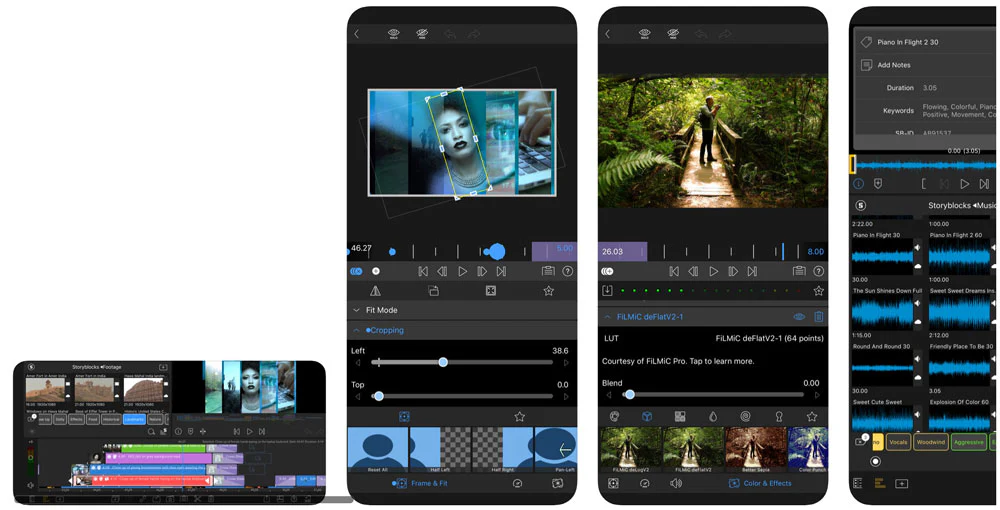
.KineMaster:If you prefer landscape (horizontal) editing and want to work with layers, this is the classic option.
.InShot:If you want to quickly edit a video for social media, it’s very simple.
2. Step-by-Step Editing Process
Step 1: Importing Footage
First, open the app and click on ‘New Project.’ Select the video clips and photos from your gallery that you want to edit.
Step 2: Trim & Split
This is the most important part of editing.
- Trim:Remove unnecessary parts from the beginning or end of a clip.
Split:Cut a long clip in half so you can remove any unwanted parts or add effects.
Step 3: Adding Transitions
When one clip ends and another begins, the transition should be smooth. Use transitions like ‘Fade,’ ‘Zoom,’ or ‘Dissolve.’ Keep in mind that overly ostentatious transitions can ruin a video, so keep it simple.
Step 4: Music and Sound Effects (Audio & SFX)
A good video is 50% visual and 50% audio.
- Background Music: Choose music according to the mood of the video.
- Sound Effects (SFX): Sounds like ‘Swoosh’ or ‘Pop’ give the video a professional touch.
- Audio Leveling: Keep the background music volume low enough so that your voiceover is clearly audible. Generally, 10-15% is the best amount of music.
3. Using Advanced Tools
- Color Grading:Adjust your video’s Brightness, Contrast, and Saturation. If your video looks dull, increasing the Vibrance can make it more colorful.
- Text & Captions:Transcribe what’s being said in the video as text. Nowadays, apps also offer ‘Auto-Captions’, which can make your task easier.
- Keyframes:It lets you move text or images across the screen. This is a sign of pro-level editing.
4. Some Important Tips (Tips for Success)
1. Keep the aspect ratio in mind:for Instagram Reels9:16, for YouTube16:9and for square posts1:1Select the frame of.
2. Free up storage:Video editing takes up a lot of space, so check your phone’s memory before you start editing.
3. Avoid over-editing:Don’t apply filters or effects to every clip. Keep the video clear and understandable.
5. Exporting the Video
When you’re done editing, press the ‘Export’ button.
- Resolution: at least 1080pSelect (Full HD).
- Frame Rate: usually 30fpsIt is the best.
- Bitrate:Don’t set it too high or the file size will become too large, use the ‘Recommended’ settings only.
conclusion:Mobile editing is a skill that comes with practice. The more you experiment with different tools, the better you’ll get.
Important of Choose Mobile Video Editing
Choosing the right app and platform for mobile video editing is just as important as shooting the video itself. If you choose the wrong app, hours of your hard work could go to waste.
Here’s a detailed explanation of the importance of choosing the right mobile video editing app:
1. Time Saving (Efficiency & Speed)
Every app has a different interface. If you’re a beginner and you choose a very complex app, you’ll get bogged down just trying to understand the tools. Choosing the right app allows you to achieve better results in less time.
Example: Choosing InShot for short reels is much more sensible than using heavy PC-like software.
2. Video Quality and Resolution (Output Quality)
Some apps reduce the quality of the video when exporting (saving) it. Choosing the right app ensures that your video is saved in 4K or 1080p without losing quality. High-definition video is crucial for a professional look.
3. Watermark Problem (Professionalism)
The biggest obstacle in video editing is the watermark. If an app’s logo is visible in the corner of your video, it looks unprofessional.
Importance: The importance of choosing apps like VN Editor is that they provide you with watermark-free videos for free, making your brand look professional.
4. Device Capability (Hardware Compatibility)
Not every phone can run every app. If your phone is old and you try to edit heavy 4K files on CapCut or KineMaster, your phone will lag.
The right choice means choosing an app that runs smoothly according to your phone’s processor and RAM.
5. Availability of Tools and Features (Specific Features)
Every video has different needs.
Green Screen: If you need to change the background, you need to choose an app that has a Chroma Key feature.
Color Grading: If you want cinematic videos, you need an app that supports ‘LUTs’ and ‘Curves’. Choosing the wrong app can leave you stuck in the middle of editing because that feature might not even be available in that particular app.
6. Platform-Specific Editing
YouTube requires horizontal editing, while Instagram requires vertical. Choosing the right app allows you to easily change the aspect ratio (video size), ensuring your content fits every platform.
Conclusion
Choosing the right mobile video editing app is the bridge between your creative vision and technical limitations. The right choice makes your work easier, while the wrong one can limit your creativity.
Would you like to know which app would be best for your current smartphone? Tell me your phone model!